Point Service
Fitted inside the luminaire, as a retrofit or in new build, it turns every light into an address, a relay and a voice.
- Where
- In the luminaire, between the power supply and the light source.
- Installation
- As a retrofit or in new build.
- Power
- From the lighting: no data cable to run.

Inside
Six parts, six functions.
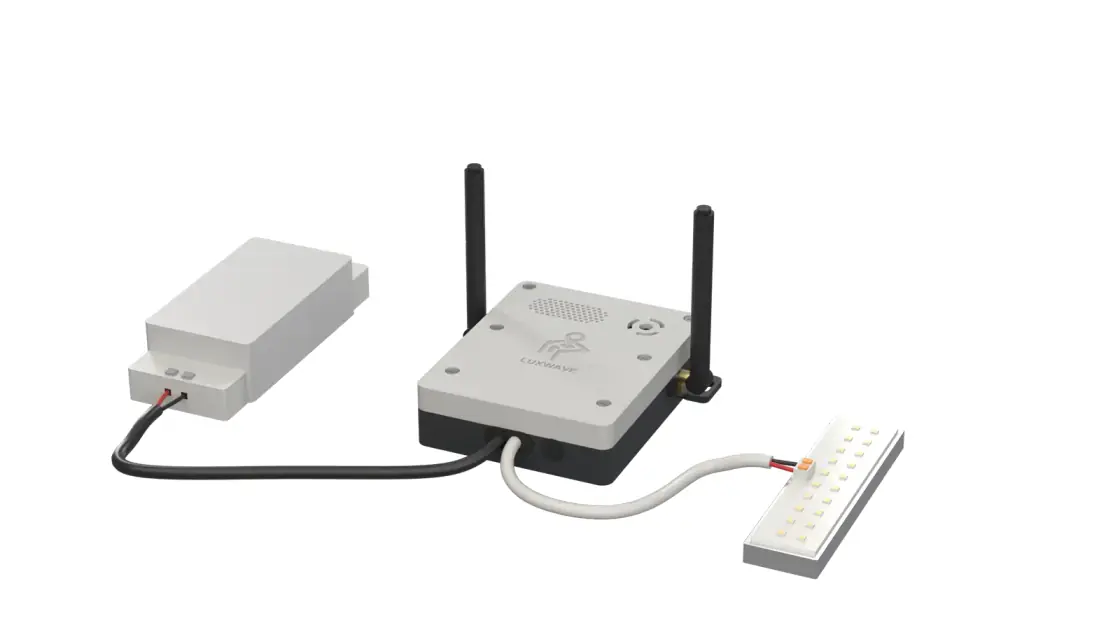
- Everything is insideA single housing, fitted inside the luminaire.
- It speaksA built-in loudspeaker, for alarm verification by voice.
- It picks up, it relaysIt picks up the badges nearby and passes the information from light to light, even with no mobile coverage.
- It emitsIt writes the zone’s address into the light.
- It controlsLights on at arrival, dimming, empty zones switched off.
- Nothing to wireIt is powered by the lighting: no data cable to run.
In use
In its place, inside the luminaire.
- 1Luminaire power supply
- 2Point Service
- 3Light source
- Nothing to add to the buildingNo anchors to install, no data cabling: the luminaire is already there.
- One zone per lightThe lighting plan is already the zone plan.
- A network that forms by itselfOn power-up, each Point Service joins the others.
From every angle
Three-quarter, front, back.


What it is for
One module, five uses.
- LocateKnow where people and equipment are, room by room.
- ProtectRaise the alert and verify it when a person on their own is in difficulty.
- GuideLead the way to the right door, to the right equipment.
- CertifyAttest that a visit really took place, at the planned location.
- Save energyMatch the lighting to the actual occupancy of the premises.
What next?
See the light at work.
A demonstration on site or remotely, based on your lighting plans.